Utah Digital Newspapers Dashboard
An interactive exploration tool for 36 million digitized Utah newspaper documents—and what they reveal.
Overview
The Marriott Library has digitized over 36 million Utah newspaper documents—spanning roughly 160 years—and made the collection available through a public API. But the archive had no way to explore itself: no visualization, no interface for asking what the collection contained or what patterns it might reveal. This project asked: what does this archive actually look like, and what can it tell us about Utah's history? My partner and I built an interactive dashboard from scratch over one semester, targeting researchers and curious general readers alike.
The problem
The Utah Digital Newspapers archive is a remarkable public resource—over 300 newspapers, millions of documents, more than a century of Utah history. But accessing it meant querying a raw API with no interface for exploration. You could retrieve documents if you knew exactly what you were looking for, but there was no way to ask broader questions: How have certain words trended over time? Which counties are well-represented in the archive? When did a particular newspaper stop being published?
Without an exploration layer, the archive's historical signal was essentially invisible to anyone without the technical ability to write their own queries.
My role & approach
This was a two-person graduate course project with equal contribution across the full project lifecycle—data exploration, visualization design, implementation, and evaluation. We used vanilla JavaScript and D3.js, pulling live data from the UDN API and supplementary geographic data from the Utah Geospatial Resource Center.
We designed for a broad audience—not just researchers who might know what they're looking for, but anyone curious about Utah history. That framing shaped every visualization choice: accessibility and learnability over density.
Process
Defining the questions
We started with exploratory data analysis using simple bar charts—a deliberate choice to understand the data before committing to any final design. Bar charts were useful but limiting, and they clarified what we actually wanted to show: temporal trends, geographic distribution, archive structure, and word-level patterns. From there, we identified five distinct questions the dashboard should answer, and designed one visualization for each.
Choosing visualization types deliberately
Each chart type was chosen for a specific reason, not by default.
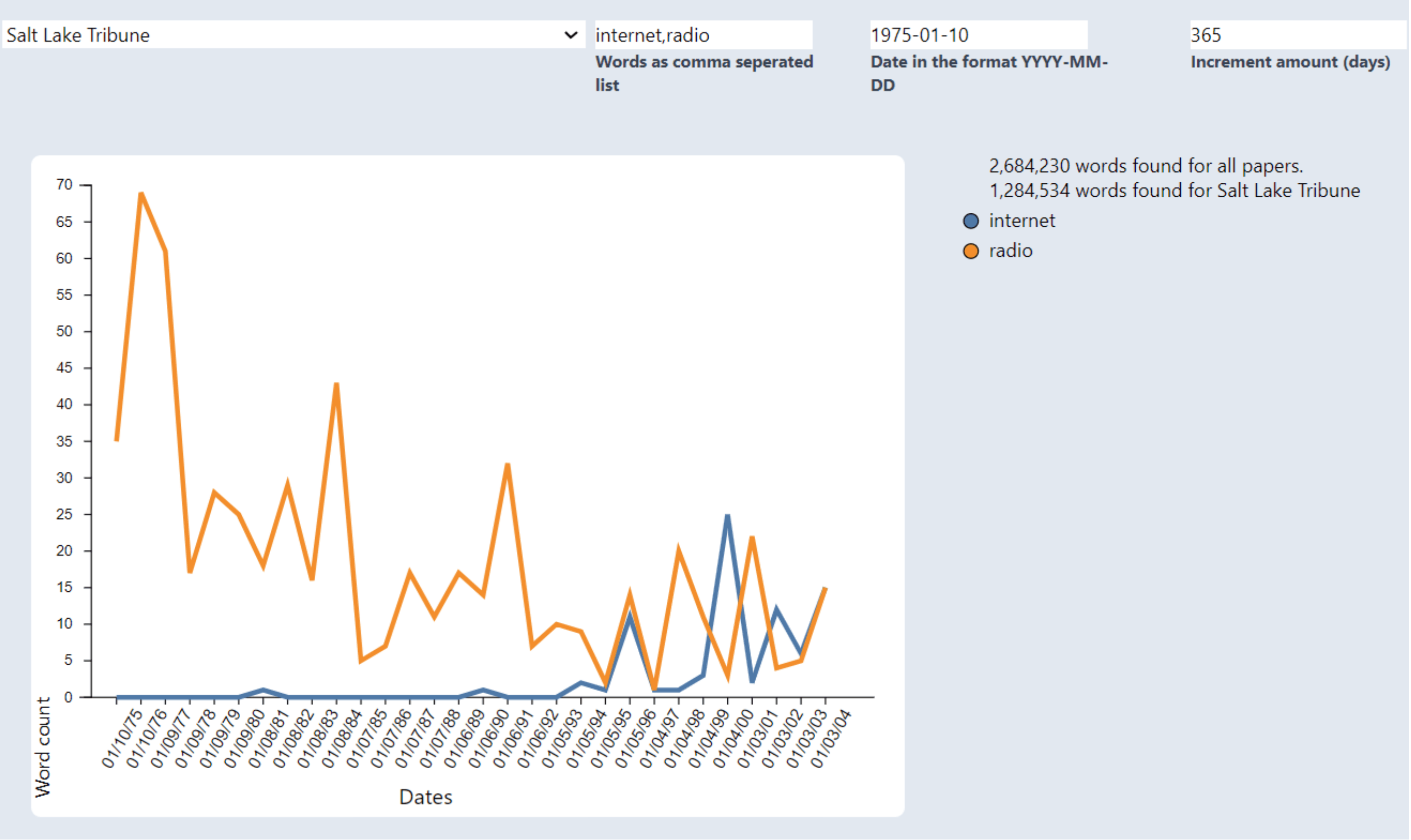
Line chart (the core view): Users search for terms, select a newspaper or "All Papers," set a date range, and receive a multi-line chart showing word frequency over time. Line charts let us show multiple search terms simultaneously—the Gestalt principle of connectedness makes the temporal relationship between lines legible in a way scatter plots or bar charts can't match. The chart includes word count transparency: each query displays how many total words were scanned across all papers, and how many came from the specific newspaper chosen. This gives users a sense of what they're actually working with.
Supplemental bar charts: Generated per query—one showing which papers were published in the user's date range (encouraging discovery of other newspapers), and one showing the top 10 most frequent words in the requested paper on each queried date.
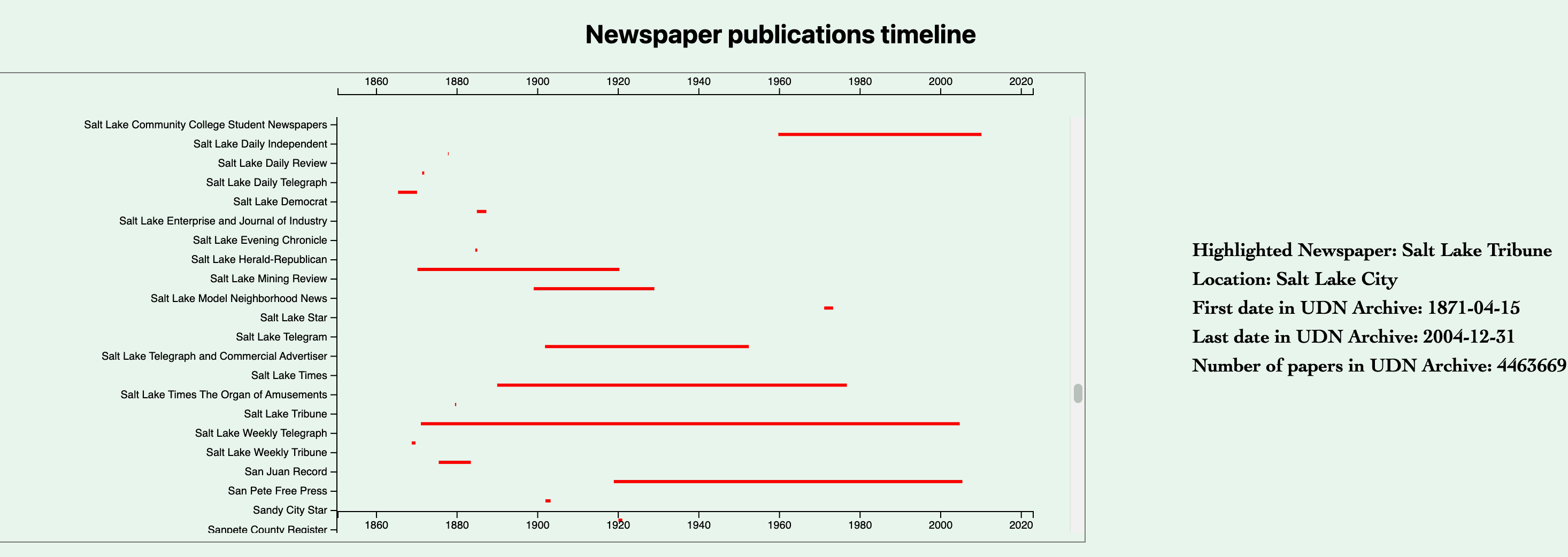
Gantt-style timeline: Shows the archive presence of all 300+ newspapers as horizontal bars on a shared time axis. We implemented vertical scrolling specifically because of scale—300+ newspapers spanning ~160 years can't be meaningfully compressed. Hover reveals newspaper name, location, and exact archive dates in a sidebar panel.
Utah map: An SVG map with dots for each city or town represented in the archive. Clicking a city populates a table with all publications from that city, their total document count, and their archive date range. Maps provide a geographic perspective that categorical charts can't give—they make the archive's uneven coverage immediately visible.
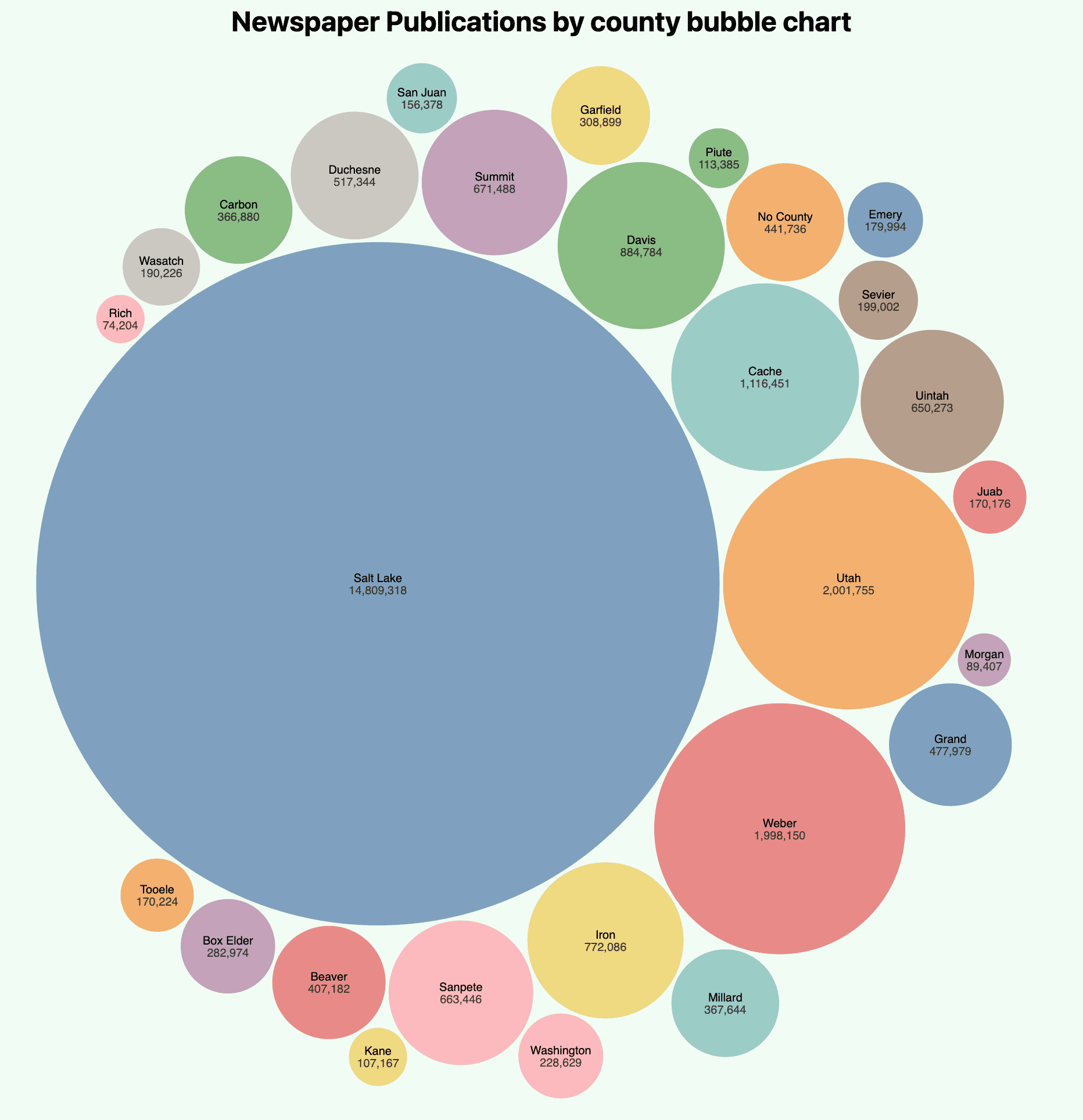
County bubble chart: Shows publication count by county. We chose bubbles over a bar chart here because Salt Lake County is a dramatic outlier—a case where extreme size difference communicates more directly in area than in bar height, even though bubbles struggle with close comparisons between similar values.
Data cleaning and responsible API usage
The UDN API's OCR data—text scanned from physical newspapers—required significant cleanup before it was usable. We implemented a stop word list and dictionary check, filtering out terms that weren't valid words before counting frequency. A naive first implementation was noticeably slow when data structures exceeded 100,000 elements; we optimized the algorithm after identifying the bottleneck.
We also gave users control over the stop word filter. Turning it off lets users search for terms like "y2k" that wouldn't survive dictionary validation—but at a real memory cost, which we surfaced in the UI so users could make an informed choice.
The API itself is inefficiently designed: finding the closest published paper to a given date can require 30–100 sequential API calls. Rather than hiding this constraint, we designed around it. The line chart's granularity controls—increment amount and number of dates—let users explicitly limit how many API calls their query generates. The UDN API is a public resource; consuming it carelessly would be poor practice, and building around the constraint made the tool more honest about what it was doing.
What the tool can actually reveal
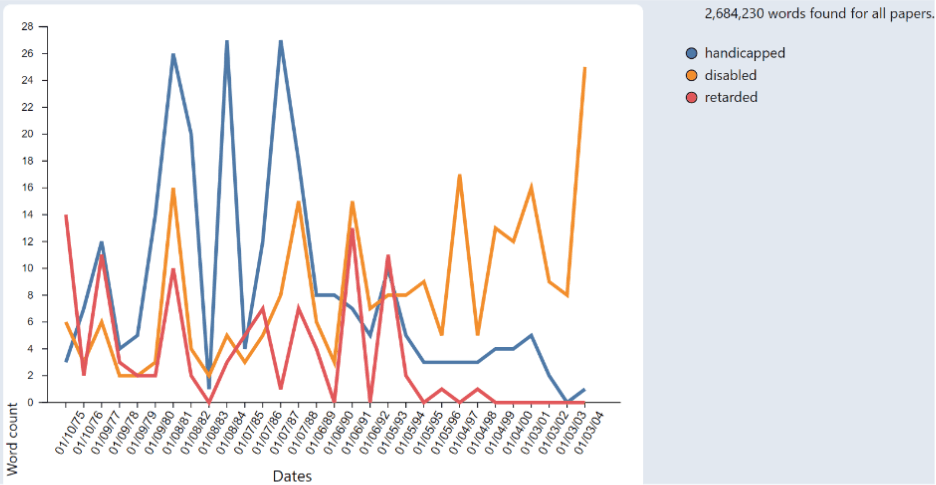
The line chart turned out to be the most revealing visualization. Tracking "handicapped," "disabled," and "retarded" across Utah papers shows a visible shift in language use after the ADA passed in 1990—"disabled" rising as older terms decline. The pattern makes cultural change legible in a way that narrative description can't quite match.
Tracking "y2k" and "millennium" shows panic accelerating through 1998–1999 and dropping off sharply after January 2000—the arc of public anxiety made visible in word frequency.
Outcome & results
We delivered five interconnected visualizations covering word frequency trends, geographic distribution, archive structure, and historical span—all pulling live from the UDN API. The dashboard makes the archive's contents legible in ways that weren't possible before, and it surfaces the archive's gaps just as clearly: where coverage is thin, which papers end too early to capture recent events, which regions are underrepresented.
We shipped a working, interactive dashboard within a single semester using no external libraries beyond D3.js. Scope was an explicit constraint, not an afterthought, and the project is better for having treated it that way.
Reflection
The map's biggest usability weakness is the absence of zoom and city labels—users need prior geographic knowledge to find specific locations. Given more time, adding zoom and inline labels would be the first change.
The bubble chart's limitation—difficulty distinguishing counties with similar publication counts—was a conscious tradeoff. A bar chart would have handled close comparisons better; bubbles handled the outlier better. I'd add click interaction next, letting users drill into the papers belonging to a given county.
The ethical API usage decision is something I'd carry into any future project involving public third-party APIs. Building around the constraint rather than ignoring it made the tool more honest about what it was doing—and more respectful of a shared resource.